Attach Existing Work Order to a Condition Assessment
- Go to Assets > Condition Assessment
- Select any existing Condition Assessment
- On the Work Order zone at the bottom of the page, click the dropdown arrow to the right of the +New button
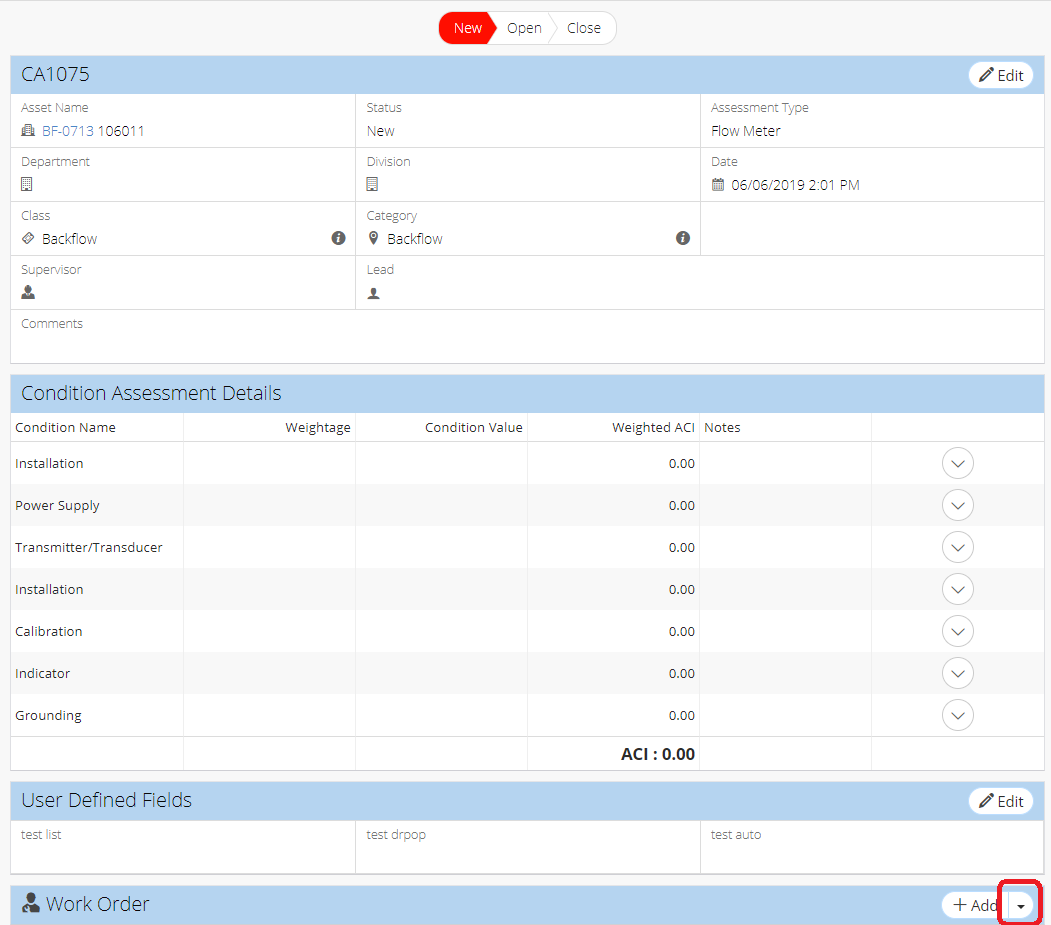
- Click +Add Existing
- Locate desired Work Order record(s), and click Attach
Related Articles
Attach a New Work Order to a Condition Assessment Record
Go to Assets > Condition Assessment Select an Existing Condition Assessment On the Work Order zone at the bottom of the page, click + Add Fill in required information marked by red asterisks Fill in remaining details Click Save On new Work Order ...
Work Order Compliance - Work Order
Compliance notes in NEXGEN allow users to note items relevant to compliance on a work order record, such as LOTO assets or outages, all in one spot. This is useful for noting whether a work order has the potential to impact things such as safety or ...
Delete a Work Order Template - Work Order
NEXGEN users have the ability to create new work orders from existing templates. If they eventually find that they have no more need for some of their templates, they also have the ability to delete them. Please note that only users with the "Delete" ...
Link Work Orders - Work Order
Linking work orders creates a relationship between two work orders which allows easy navigation between the linked work orders within NEXGEN. Additionally, this relationship will show up in reports. Linked work orders can be used in a variety of ...
Detach Work Order from a Condition Assessment Record
Go to Assets > Condition Assessment Select an existing Condition Assessment record to which Work Order is attached In the Work Order zone, locate the Work Order to detach Click on the dropdown arrow to the right of the Work Order record Click Detach ...