Enable a UDF as a Search Parameter - User Defined
NEXGEN users have the option to adjust the visibility of existing UDFs in select modules' search sections. Doing so will allow for the UDF to be used as a search parameter. Navigate to the User Defined Module
Adjust UDF Visibility
Navigate to the User Defined Module
To navigate to the User Defined module:
- From the NEXGEN dashboard, click "Settings" in the blue navigation bar to the left.
- Click "Setup."
- Click "User Defined."
Adjust UDF Visibility
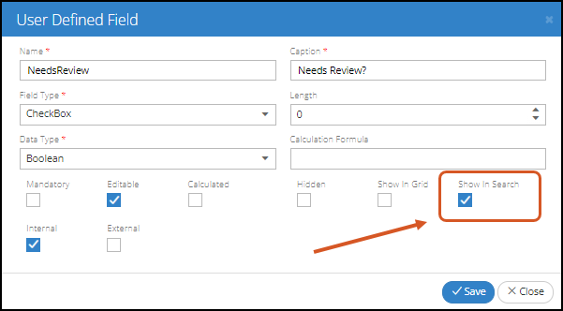
- Create a new UDF or select an existing UDF from the User Defined module.
- Enable "Show in Search."
- Click "Save."
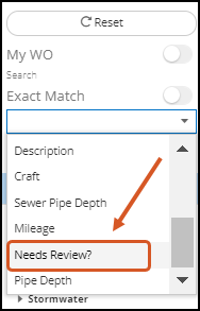
- End users will then be able to select the UDF as a search option when looking for assets.
Related Articles
Adding a UDF to a Work Order Asset - User Defined
Users can create User Defined Fields (UDFs) that will be specific to each asset on a work order. These UDFs can be configured for all work orders or work orders for a particular department, division, or main task. Configuring a Work Order Asset UDF ...Mandatory UDFs at Status Change - User Defined
User-defined fields (UDFs) can now be made mandatory at any status change on service requests and work orders. For example, certain UDFs might be required in order to Complete the work order vs Close the work order. Navigate to Settings > Setup > ...User Group Permission Definitions
We're going through some changes! As we continue to make improvements to our software, we are changing how our permission options affect end users. Because of this, you may notice that some permissions are listed as not in use. Thank you for your ...Show or Hide Previous Values of a Form - Forms
Users can choose to show or hide previous values from an Inspection if they would like field workers to fill out wholly new values instead of modifying old ones. Toggling this option can be done in the User Defined module when creating or editing an ...User Defined Module Overview
NEXGEN software has many fields that can be customized to personalize your software. These fields are called UDFs or User Defined Fields. Within the "Settings" module, you can edit these UDFs to align with your current workflows. To learn more about ...
Recent Articles
NEXGEN Admin Webinar Series (Part 7: Workflow Automation & User-Defined)
Video Guides: How to Use NAMI Dashboards
Accessing NAMI Dashboards Learn how to locate and access NAMI Dashboards within Work Orders, Service Requests, and Preventive Maintenance. Changing Tabs and Interactive Functionalities See how to navigate dashboard views, explore different metrics, ...June 2026 New Feature Webinar
Latest Phone Release - Version 2.0.5 (June 2026)
Phone Application Updates Asset Inventory Users can now type in an asset QR code in the search bar to find an asset in addition to scanning. (#23758) Form A quick action button to create a form will now be visible in the Hotspot. Users can tap to ...iPad Version 3.0.6 (April 2026)
iPad Updates Bug Fixes Resolved comments cutting off on mobile devices. (#24035) Fixed the issue of a Flag label unintentionally showing when completing assets. (#26071) Users should now be able to request items that are at zero quantity from the ...