Delete a Contact from Contractor record
- Go to Resource > Contractor
- Open existing contractor (or search by Contractor information)
- In the Contact zone on the top right of the page, click the dropdown arrow next to the Contact you wish to delete
- Click Delete
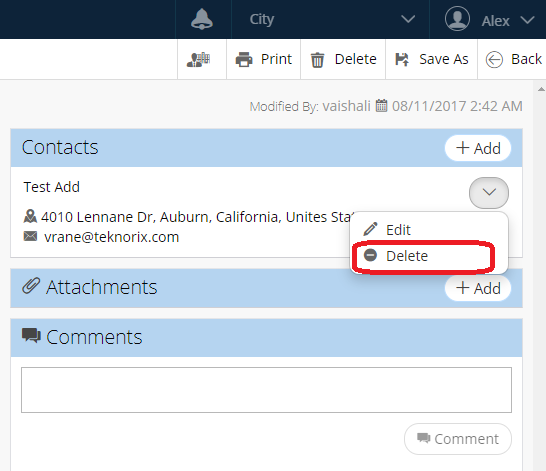
- Confirm deletion by clicking Ok
Related Articles
Contact a Requester through an SR Record - Service Request
As of NEXGEN version 12, you can now contact service request requesters via their service request records. This is useful for directly providing updates to requesters about their service requests. Any correspondence can be tracked using the External ...
Edit Contact from Contractor record
Go to Resource > Contractor Open existing Contractor (or search by Contractor information) In the Contact zone, click the dropdown arrow next to the Contact you wish to edit Click Edit Update information as needed Click Save
Delete Contractor record
Go to Resource > Contractor Open an existing Contractor (or search by Contractor information) Click Delete button on the toolbar on the top right of the screen Confirm deletion by clicking Delete again
Delete a Resource from a Parent PM - PM
If there is a resource attached to a parent PM that you would like to delete, you can do so by following the steps below. Navigate to the Preventive Maintenance Module To navigate to the Preventive Maintenance module: From the NEXGEN dashboard, click ...
Item Record Overview - Warehouse Inventory
Each item catalogued in the warehouse inventory module has its own record. The item details can be viewed and edited in the NEXGEN software. This article goes over both stock and non-stock item records within the Warehouse Inventory module. Item ...