Add Asset Redundancy Information to an Asset Record - Asset Inventory
Asset redundancy refers to when spare assets are kept on hand specifically to replace each other. This is related to (but more specific than) having spares in the warehouse; redundancies are typically managed per location and won't be used for other areas. Having these redundancies on hand means there is lower risk of significant operational or business impact from the asset failing and can be used to lower the asset's ARI (asset risk index) score.
Keeping track of redundancies helps define a more accurate risk score for assets based on how many spares are available. See the article below to learn how to add asset redundancy information to an asset record.
 Add Asset Redundancy Information to an Asset Record
To add asset redundancy information to an asset record:
- Navigate to the Asset Inventory module.
- Open an asset record.
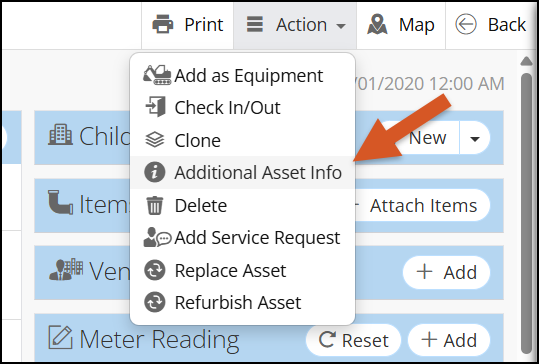
- In the top right, click Action > Additional Asset Info.
- A slider will appear. Scroll down to the Asset Redundancy section and enable the "Has Redundancy" toggle.
- Fill out the asset redundancy information fields.
- Total Assets in Process: Refers to the total number of assets of the same type that are used in the same process (must be larger than your number of redundancies).
- No. of Redundancies: Refers to the total number of assets that are considered spares within the identified process.
- Redundancy Factor: A calculated decimal field dependent on the above fields. Final ARI values are multiplied by the redundancy factor that leads to a lower Risk score.
- Click Save. The asset redundancy information is now stored and accounted for in the asset's ARI.
Related Articles
Create a New Asset - Asset Inventory
In NEXGEN, an asset can be defined as any piece of physical property that requires maintenance. Assets are tracked and managed in the Asset Inventory module. Before adding assets to the NEXGEN system, users should determine their own criteria for ...Asset Replacement and Refurbishment - Asset Inventory
If an asset needs to be replaced and/or refurbished, you can follow the workflows below to document the process in NEXGEN. The processes involve a technician who performs the work needed and records asset details as well as an asset manager who ...Add Items to a Work Order - Work Order
Previously, adding items to work orders involved a pop-up screen where you could search for items in a list. As of NEXGEN version 12, we have added smarter features for adding items to work orders. The system will now allow users to add items to a ...Warehouses, Locations, and Categories Overview - Warehouse Inventory
When you are building or growing your warehouse, you will likely have to add additional warehouses, other locations within your warehouse, or categories to your warehouse navigation tree. Look below for more information on adding locations and ...Item Record Overview - Warehouse Inventory
Each item catalogued in the warehouse inventory module has its own record. The item details can be viewed and edited in the NEXGEN software. This article goes over both stock and non-stock item records within the Warehouse Inventory module. Item ...
Recent Articles
NEXGEN Admin Webinar Series (Part 7: Workflow Automation & User-Defined)
Video Guides: How to Use NAMI Dashboards
Accessing NAMI Dashboards Learn how to locate and access NAMI Dashboards within Work Orders, Service Requests, and Preventive Maintenance. Changing Tabs and Interactive Functionalities See how to navigate dashboard views, explore different metrics, ...June 2026 New Feature Webinar
Latest Phone Release - Version 2.0.5 (June 2026)
Phone Application Updates Asset Inventory Users can now type in an asset QR code in the search bar to find an asset in addition to scanning. (#23758) Form A quick action button to create a form will now be visible in the Hotspot. Users can tap to ...iPad Version 3.0.6 (April 2026)
iPad Updates Bug Fixes Resolved comments cutting off on mobile devices. (#24035) Fixed the issue of a Flag label unintentionally showing when completing assets. (#26071) Users should now be able to request items that are at zero quantity from the ...